⭐ 4.9/5 Rating
Based on 6,000+ student reviews
🎓 10,000+ Enrolled
Students worldwide
👨🏫 10+ Years Experience
Industry expert trainers
📈 90% Placement Success
Students placed in top companies
📅 Course Duration
2 1/2 Months
💰 Course Price
₹ 25000
🎥 Watch Demo
📄 Course Content
Azure Data Engineer Training in Bangalore
Enroll for Master Azure Data Engineering Training in Bangalore with Version IT. Learn industry related skills such as data warehousing, big data analytics and pipeline management.
Azure Data Engineer Course Overview
This Microsoft Azure data engineering career is highly marketable because of the growing demand of professionals in this field. To help individuals polish their azure data engineering skills, Version IT provides the best Azure data engineer training in Bangalore. We have customers who know how to use cloud data solutions and best practices with Azure data factory, synapse analytics, data bricks and Azure data services such as Cosmos DB.
Our instructors are professionals of the industry who provide full training using real -life conditions. For information about our azure data engineering training in Chennai, now contact us and start exercising to become a certified azure data engineer.
Best Azure Data Engineering Training in Bangalore
Version IT offers its students the most effective online training of an Azure Data engineer so that they become knowledgeable in data-oriented jobs. We provide training to those who wish to achieve azure data engineer certification and acquire some knowledge on cloud-based data engineering in the process. As a beginner or an experienced business man, our azure data engineering course in Chennai offers you the most viable path towards career advancement.
Key Features of Version IT’s Azure Data Engineering Training in Bangalore
Here is why Version It is the top Azure Data Engineer Training Institute in Bangalore:
Flexible teaching structure The combination of platforms and ease of learning offers modern students a chance to increase and adapt their learning in the simplest way. | Learn from expert instructors Learn from culture-transported trainers who bring a treasure of experience from the workplace. Learn practical skills and strategies that will assure success in your field. |
Unlimited practical class Learn from the above culture that the trainers without the limit through increased sessions to intensify their skills in a practical way on a constant basis. | Internship opportunity Enter your career with the experience of the relevant industry through our internship program. Projects will be handed over to work even after taking advantage of one-on-one advice to prepare you for various challenges. |
Interview and career guidance Complete the great heights in your career with interview tips and proper training with career goals obtained under your personal guidance. | Endless job opportunities Jump starts your career with a job crowd where anyone can get many job opportunities and build a successful career without limit. |
Available Azure Data Engineering Training Options in Bangalore
Certification Path for Azure Data Engineering In Bangalore
Our training is associated with certification programs, and on completion of all necessary projects, you will get a certificate of completion of a course from Version IT along with other relevant certificates.
This skill credential verification that you have successfully completed all assignments, exercises, projects and case studies.
This certificate can be shared to help enhance your professional image on LinkedIn, Facebook, Twitter and more.
Main attraction
- SOPs were prepared in view of the deep knowledge of data analytics services on Azure Synapse, Azure Data Factory, Azure Security, and Data Analytics services on distributed data processing.
- A specialist gave lectures on the construction of distributed data systems, cloud computing and azure data pipeline.
- The program aims to be completed by mid -level software developers, system administrators, cloud architects, data engineers, information technology safety experts and azure data engineering devops advisors.
Topics You will Learn
● Understanding different Cloud Models
● Advantages of Cloud Computing
● Different Cloud Services
● Different Cloud vendors in the market
● Introduction to Azure
● Azure cloud computing features
● Azure Services for Data Engineering
● Introduction of Azure Resources/Services with examples
● Azure management portal
● Advantage of Azure Cloud Computing
● Managing Azure resources with the Azure portal
● Overview of Azure Resource Manager
● Azure management services
● What is Azure Resource Groups
● Configuration and management of Azure Resource groups for hosting Azure
services
● Completed walkthrough of the Azure Portal with all the features
● What is Resource Groups and why do we need RG’s in Azure cloud computing
platform to host resources?
● Different types of Storage Accounts provisioning in Cloud computing with
different storage services
● Details explanation & understanding of different Blob/container storage
services
● Creating and managing the data in container storage services with Public and
Private accesses as per the need of a project
● Implementation of Snapshots for Blob storage services and File share storage
service
● Generating SAS for different storage services to make the storage content
browseable across all the globe or Publicly
● What is Standard Storage Account and Premium Storage account and which to
use accordingly as per the real time scenarios
● Detail explanation and implementation of Data Lake storage Gen2 Storage
Account to store the unstructured data in cloud storage services
● All the features/properties(Overview, activity log, Tags, Access control(IAM),
Storage browser…etc) of Azure Storage Accounts
● Maintenance and management of Storage keys and connection string for Azure
Storage services
● Implementing different levels of access(Reader, contributor, owners…etc) to the
Azure Storage accounts
● Moving the storage account with storage content across different Resources
Groups based on real time scenarios
● Migrating the data from On-prem(Private cloud) to Azure Storage account
(Public cloud) using Az copy(forward migration)
● Migrating the data from public cloud to Private cloud(reverse migration)
● Implementing the Az copy commands to migrate the data
● Moving the SA & its content from one Resource Group to another
● Azure Storage explorer for creating, managing, and maintaining the Azure
storage services data
● Installation of Azure Storage Explorer and what is the purpose of this tool for
Azure Storage accounts(its Purpose & benefits with real time scenarios)
● Generate Shared Access Signature(SAS) in Azure Storage Explorer(ASE) for
security implementation of Storage account content
● Managing of Access keys & connection strings of SA with Azure Storage
Explorer
● Configuration of Authentication and Authorization for Storage Account via
Azure Active Directory
● Hosting File share Storage services to On prem servers or Cloud Servers as
shared drive for File share servers
● Introduction to SQL DB’s
● Creation of new SQL DB’s & Sample SQL DB’s both in On-prem and Cloud
computing
● Planning and deploying Azure SQL Database
● Implementing and managing Azure SQL Database
● Managing Azure SQL Database security
● Planning and deployment of SQL DB’s in Azure cloud computing with real time
scenarios
● Different DB’s Deployment options
● Databases purchasing models.(VCore & DTU’s)
● Visualization of cloud DB server, Database, and validation of data from
on-prem(private cloud)
● Implementation of Firewall security rules on Azure DB servers to access and
connect from on-prem SSMS
● Creation of Database in on-premises and synch with azure cloud
● Migrating SQL DB’s from On-premises to Azure cloud computing using
Microsoft Data migration assistant
● Restoring SQL DB’s from On-prem to cloud computing
● Migration of Specific DB objects from on-prem to cloud based upon base upon
project requirements
● Implementation of RSV and scheduling the backups of SQL DB’s and Azure
Storage Account file share services on schedule, on demand based upon real
time scenarios
● Introduction to SQL DB Queries
● SQL queries detail explanations, syntax & execution based upon real time
scenarios
● Deep understanding and implementation of concepts/Components of ADF
● Building blocks of Azure Data Factory
● Complete features and walk through of Azure Data factory studio
● Different triggers and their implementation in ADF
● What is integration run time and different types of integration run time in ADF
● When to use ADF
● Why to use ADF
● Different types of ADF pipelines
● Pipelines in ADF
● Different types of Activities in ADF
● Datasets in Azure Data factory
● Linked services in ADF
● Copying the data from Blb Storage account to ADL’s Gen2 Storage account
● Copying of zip files(.csv) from Blob SA to ADL’s Gen2 SA using ADF
● Implementation and explanation of Metadata control in ADF to find the structure
before copying the data
● Implementation and explanation of Validation and If Condition
● Implementation of Get Metadata control, filter control & For Each Control or
activities in ADF
● Implementation & execution to copy the data from GitHub platform to Azure
Storage services with variables and parameters
● Implementation of Foreach control, copy data control and Set variable to
dynamically load the data from source to target using ADF
● Creating Dynamic pipelines with lookup activity to copy multiple .csv files data
picking form Json format data in Azure Storage services
● Copying the files from GitHub Dynamically with the use of Dynamic parameters
allocation-AUTOMATION PROCESS
● Copying the data from different files formats(.csv, .xlsx, .txt, .Parquet, .Json,
.SQL…etc) using suitable ADF controls/activities
● Implementation and execution of Loading the data from Blb SA to SQL DB single
table & multiple tables using copy data activity, ForEach activity
● Executing multiple pipelines in parallel with Execute pipeline activity
● Implementation of Schedule based triggers for different ADF pipelines
containing different activities.
● Implementation of Event based triggers for different ADF pipelines containing
different activities.
● Implementation of Thumbling window-based triggers for different ADF pipelines
containing different activities.
● Implementation and execution of storage and Event based triggers.
● Detail explanation & implementation of Azure Keyvaults
● Making the SQL DB connection string to store in Keyvault to enhance the
security for SA content and SQL DB
● Generating the secrets inside the Azure keyvault and granting access by
implementing the access policies for different users
● Detail walk through of GitHub portal
● Creating an account, repo’s, in GitHub portal
● Integrating Azure Data Factory with GitHub Portal as per project requirements.
● Placing, maintaining and executing the source code via GitHub portal for Azure
Data Factory.
● Creating master branch, practice branches in GitHub portal to merge the newly
created code via Pull Requests.
● Setting up the Repo for ADF pipelines and converting to live mode from GitHub
portal covering with real time scenarios.
● Designing new Data flows
● Designing and implementing transformations
● Inline Datasets in data flow source control
● Designing and implementing of Data flow with Source transformations, Filter
transformations & Sink transformations in ADF with inline Datasets
● Implementation of Select transformations with Data flows for various source
controls
● Implementation of Dataflows using Aggregate & Sink transformation
● Implementation of Dataflow with conditional split & Sink transformation with
copy data activity
● Implementation of Dataflow with Exists & Sink transformation
● Implementation of Azure Dataflows for Derived column transformation with
Source & Sink transformation
● Implementation of Azure Dataflows to connect to SQL DB with Source & Sink
transformation
● Union & Union flow transformation implementation with ADF Data flows
● Implementation of Azure Dataflows to connect to SQL DB with Source & Sink
transformation
● Implementation of windows functions…like Rank() function, Dense_Rank()
function, Row_Number() function…etc.
● What is Apache Spark, details explanation and implementation of Apache Spark
● Illustration and Elaboration of Apache Spark Architecture
● Explanation of RDD & DAG
● Understanding of different Apache Spark components
● What are worker nodes and slaves nodes in Azure Data Bricks clusters
● Implementation of Azure Databricks cluster by considering different worker
nodes and slave nodes
● Different features and properties of Azure Data Bricks clusters
● Creating single node and multi nodes clusters
● Creation of Pyspark notebooks in Databricks cluster to fulfil different business
requirements
● What is Azure Synapse Analytics
● Implementation of Linked Services/Datasets in Synapse Analytics
● Implementation of dedicated SQL Pool inside Synapse Analytics
● Implementation of serverless SQL Pool inside Synapse Analytics
● Creation of Apache spark pool in Azure Synapse Analytics
● Writing SQL Script in Azure Synapse analytics to get the result set in tabular and
chart formats
● Visualizing the data in Synapse analytics in variety of different charts (like pie
charts, line charts, bar charts…. etc)
● Designing of Synapse Analytics pipelines by considering various activities as
per the business requirements
● Creation of Datasets, Linked services for Synapse Analytics pipelines
● Data analysis with serverless spark pools in Azure Synapse Analytics
● What is Apache spark in azure synapse analytics
● Designing and development of Apache spark pool in Azure synapse
● Creating Spark Databases and tables to load the data from source system and
analysing the data in Synapse analytics
● What is Azure Stream Analytics
● Purposes and usage of Stream Analytics in Azure cloud computing
● Benefits and advantages of stream analytics
● Architecture diagram of data flow in Azure stream analytics with other cloud
services
● Understanding & usage of browser-based Raspberry Pi simulator
● Deployment of IoT Hub services as an input for Stream analytics jobs
● Implementation & execution of stream analytics jobs and designing inputs and
outputs for IoT Hub and Datalake Gen2
● Writing SQL scripts to generate live streaming data and loading it in destination
Let Your Certificates Speak
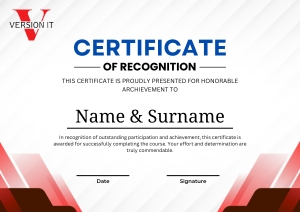
- Comprehensive training in Azure Data.
- Certificates are globally recognized & they upgrade your programming profile.
- Certificates are generated after the completion of course.
All You Need to Start this Course
- Engaging and interactive course content.
- Expert-led instruction for a deeper understanding.
FAQ's
Through this training, you will develop strong specialization in data warehousing, big data analytics and ETL process design. You will also learn to manufacture, manage and adapt to complex data pipelines on Azure. Hands full of projects will increase your understanding of real-world applications. Finally, you will be confidently equipped to manage enterprise-scale data solutions.
The training course usually takes about 8 to 12 weeks to end, based on the selected teaching format. The instructor -led classes may take longer than intense boot camps. Self-book learners can complete it quickly, although the project work can expand the timeline. The duration ensures adequate coverage of both theory and the practice on both hands.
Azure data engineering stands out due to its deep integration with the ecosystem of Microsoft. It provides advanced analytics, AI-powered insight and well-organized pipeline management. Unlike many platforms, it provides cost -effective scalability for enterprise needs. It’s built -in security and governance also make it a favorite option for enterprises.
The cost of Azure data engineering training may vary widely depending on the institution and course type. On average, the fees can range from moderate to premium pricing. Courses including certification preparations, live projects and placement support are higher. Investing in these programs usually gives strong career returns in the technical market.
After completing the course, you can work in various data-centric roles. General occasions include data engineers, azure data analysts and BI developers. Many professionals also go into roles like Big Data Engineer or Cloud Data Architect.
Enquiry Form
Trustindex verifies that the original source of the review is Google. Version IT is the perfect place for Python Training in Hyderabad. The trainers explain every concept step by step, making it easy even for beginners. The institute provides practical exercises, projects, and interview preparation. I learned a lot and gained confidence to work in Python-related roles. I’m thankful for the wonderful training experience here.Posted onTrustindex verifies that the original source of the review is Google. My experience with Version IT’s Python Training in Hyderabad was excellent. The trainers are very knowledgeable and supportive. They teach with real-time examples and ensure every student understands the topics well. The curriculum is industry-oriented with hands-on practice. Thanks to their guidance, I am confident in building Python applications. Version IT is highly recommended!Posted onTrustindex verifies that the original source of the review is Google. My experience at Version IT’s Azure Data Engineer Training in Hyderabad was truly outstanding. The trainers have deep industry expertise and focus on real-time implementation of Azure services. The curriculum includes data pipelines, cloud integration, and visualization tools. The institute also provides mock interviews and job assistance. Thanks to Version IT, I developed the skills required to excel as an Azure Data Engineer.Posted onTrustindex verifies that the original source of the review is Google. Version IT’s Python Full Stack Training in Hyderabad provided me with excellent technical knowledge and hands-on experience. The trainers are highly experienced and explain each concept clearly. The course covers Python, Django, React, and database integration in detail. The institute also provides real-time projects and placement support, helping me start my career confidently as a Full Stack Developer. Highly recommended!Posted onTrustindex verifies that the original source of the review is Google. Version IT offers outstanding Java Full Stack Training in Hyderabad. The faculty is very experienced and focuses on both theory and practical learning. The course structure is well-designed with hands-on projects that enhance coding and problem-solving skills. The environment is motivating, and the placement team is very supportive. I’m thankful to Version IT for shaping my development career.Posted onTrustindex verifies that the original source of the review is Google. My experience with Version IT’s Java Full Stack Training in Hyderabad was excellent. The trainers provide step-by-step guidance and explain real-world applications. The course covers all modern tools and technologies like Java, React, Spring Boot, and MySQL. Their mock interviews and career assistance helped me get job-ready. Version IT truly provides industry-oriented full-stack developer training.Posted onTrustindex verifies that the original source of the review is Google. Version IT’s Python Full Stack Training in Hyderabad exceeded my expectations. The trainers are experts who teach using real-time projects, ensuring deep understanding. The course focuses on both frontend and backend technologies like Python, Django, and JavaScript. Their career counseling and placement support were very helpful. I’m truly grateful to Version IT for shaping my path as a Full Stack Developer.Posted onTrustindex verifies that the original source of the review is Google. Version IT’s Azure Data Engineer Training in Hyderabad was an exceptional learning experience. The trainers are knowledgeable and provide in-depth understanding of Azure tools, data pipelines, and cloud storage. The course includes real-time projects and hands-on practice, which improved my technical skills. Thanks to Version IT’s expert guidance and placement support, I was able to confidently begin my career as a Data Engineer.Posted onTrustindex verifies that the original source of the review is Google. Version IT provides the best Azure Data Engineer Training in Hyderabad with a perfect blend of theory and practical sessions. The trainers focus on real-world cloud data engineering applications using Azure services. The learning environment is interactive, and the placement support is excellent. I’m grateful to Version IT for providing such comprehensive training that prepared me for a successful data engineering career.Posted onTrustindex verifies that the original source of the review is Google. Enrolling in Version IT’s Azure Data Engineer Training in Hyderabad was one of my best career decisions. The course is well-structured, covering data storage, transformation, and analytics using Azure tools. The trainers are patient and explain complex concepts in a simple manner. The institute’s placement support and hands-on sessions helped me become confident in real-time project handling. Highly recommend Version IT!
Our Popular Blogs
Best Way to Learn Python Online in Hyderabad After Office Hours

Playwright Training in Hyderabad: A Smarter Way to Learn Test Automation